





What Is Two-Factor Authentication (2FA)? How It Works and Why It Matters
Two-Factor Authentication (2FA) is one of the most effective ways to secure online accounts against cyber threats. Even if a hacker steals your password, 2FA adds an extra layer of verification before access is granted. Today, banks, email providers, social media platforms, cloud services, and businesses widely use 2FA to protect sensitive information and reduce the risk of unauthorized account access. As cyberattacks become more sophisticated, enabling Two-Factor Authentication has become an essential cybersecurity practice for both individuals and organizations.
What Is Two-Factor Authentication (2FA)?

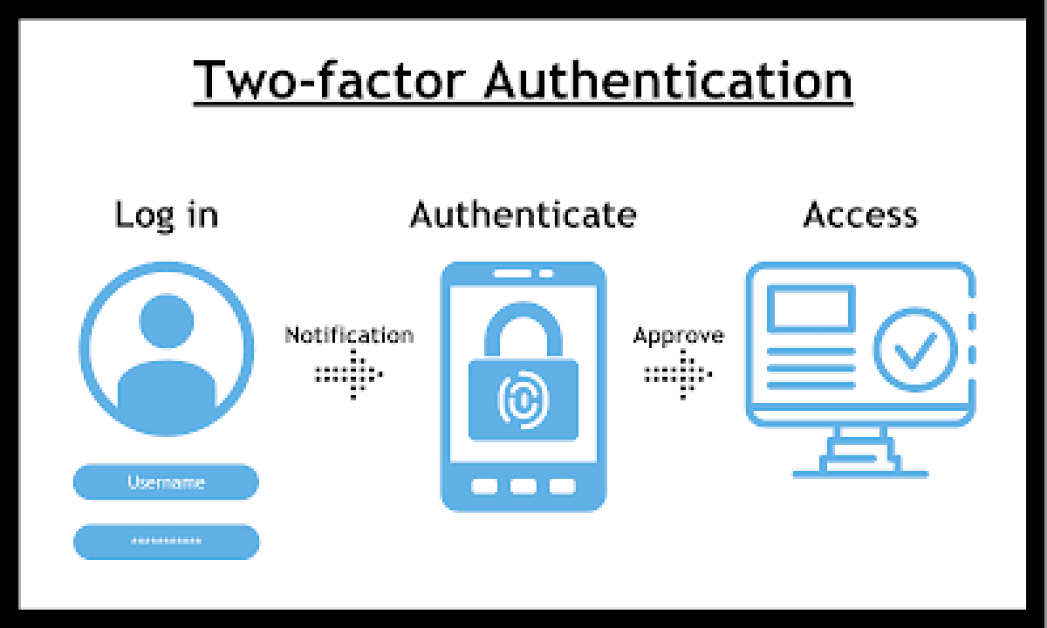
Two-Factor Authentication (2FA) is a security process that requires users to verify their identity using two different authentication factors before accessing an account or system.
How 2FA Works
After entering a username and password, users must provide a second form of verification. This additional factor may be a one-time password (OTP), an authentication app code, a fingerprint, facial recognition, or a hardware security key. Access is granted only after both authentication steps are successfully completed.
Why 2FA Matters
Passwords alone can be stolen through phishing attacks, malware, or data breaches. Two-Factor Authentication significantly reduces the likelihood of unauthorized access by requiring an additional verification step.
Types of Authentication Factors
2FA combines two different categories of authentication.
Something You Know
This includes passwords, PINs, or security questions that only the user should know.
Something You Have
Examples include a smartphone receiving an OTP, an authentication app, or a physical security key.
Something You Are
Biometric authentication uses fingerprints, facial recognition, iris scans, or voice recognition to verify identity.
Common Types of Two-Factor Authentication
Several 2FA methods are widely used.
SMS One-Time Password (OTP)
A unique verification code is sent via text message and must be entered during login.
Authentication Apps
Apps such as Google Authenticator, Microsoft Authenticator, and Authy generate time-based one-time passwords (TOTPs) for secure account verification.
Push Notifications
Users receive a notification on a trusted device to approve or deny a login attempt with a single tap.
Hardware Security Keys
Physical security keys connect through USB, NFC, or Bluetooth and provide one of the strongest forms of authentication against phishing attacks.
Biometric Authentication
Many smartphones and laptops use fingerprints or facial recognition as the second authentication factor.
Benefits of Two-Factor Authentication
2FA offers several important security advantages.
Stronger Account Protection
Even if a password is compromised, attackers cannot easily access the account without the second verification factor.
Reduced Risk of Identity Theft
Additional authentication makes it significantly more difficult for cybercriminals to impersonate legitimate users.
Better Protection Against Phishing
Authentication apps and hardware security keys provide stronger protection than passwords alone against many phishing attacks.
Improved Compliance
Organizations use 2FA to help meet cybersecurity regulations and industry security standards.
Challenges of Two-Factor Authentication
Although highly effective, 2FA has certain limitations.
User Convenience
The extra verification step can slightly increase login time compared to password-only authentication.
SMS Security Risks
SMS-based verification codes can be vulnerable to SIM-swapping attacks or message interception, making authentication apps or security keys more secure options.
Device Dependency
Users may experience difficulties accessing accounts if they lose the device used for authentication without having backup recovery methods.
Best Practices for Using 2FA
Following these recommendations improves account security.
Enable 2FA Everywhere
Turn on Two-Factor Authentication for email accounts, banking services, cloud storage, social media platforms, and work applications.
Use Authentication Apps
Whenever possible, choose authenticator apps or hardware security keys instead of SMS verification.
Save Recovery Codes
Store backup recovery codes in a secure location so you can regain access if your authentication device is lost or damaged.
Keep Devices Secure
Protect smartphones and authentication devices with strong passwords, biometric security, and software updates.
Future of Two-Factor Authentication
Authentication technologies continue to evolve with passwordless login systems, passkeys, biometric authentication, hardware security keys, and AI-powered identity verification. Many organizations are moving toward phishing-resistant authentication methods that provide stronger protection while improving user convenience. As cyber threats continue to increase, Two-Factor Authentication will remain a fundamental component of modern digital security.
Conclusion
Two-Factor Authentication is one of the simplest and most effective ways to improve online security. By requiring a second form of identity verification in addition to a password, 2FA greatly reduces the risk of unauthorized account access and cyberattacks. Whether protecting personal accounts or enterprise systems, enabling Two-Factor Authentication is a critical step toward stronger cybersecurity.
 What Is Two-Factor Authentication (2FA)? Complete Guide FAQs
POST A COMMENT (0)
All Comments (0)
Replies (0)