What Is Multi-Factor Authentication (MFA)? How It Works and Why It Matters
Multi-Factor Authentication (MFA) is a security method that requires users to verify their identity using two or more independent authentication factors before accessing an account, application, or system. While passwords remain important, they can be stolen through phishing attacks, malware, or data breaches. MFA significantly strengthens security by adding additional verification steps, making it much more difficult for attackers to gain unauthorized access. Today, MFA is widely used by banks, businesses, cloud providers, healthcare organizations, government agencies, and online services.
What Is Multi-Factor Authentication (MFA)?

Multi-Factor Authentication (MFA) is an authentication system that requires multiple forms of identity verification before granting access to digital accounts or systems.
How MFA Works
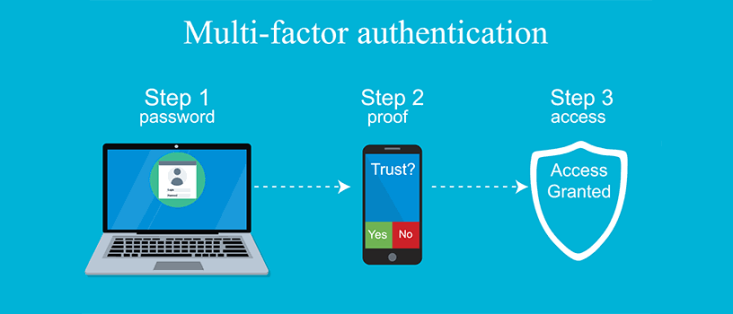
After entering a username and password, users must verify their identity using one or more additional authentication methods. These may include authentication app codes, hardware security keys, biometric verification, push notifications, or one-time passwords (OTPs). Access is granted only after all required authentication factors have been successfully verified.
Why MFA Matters
Even if attackers obtain a user's password, they typically cannot access the account without the additional authentication factors, greatly reducing the risk of unauthorized access.
Authentication Factors Used in MFA
MFA combines different categories of identity verification.
Something You Know
This includes passwords, PINs, or answers to security questions.
Something You Have
Examples include smartphones receiving authentication codes, authenticator apps, smart cards, or hardware security keys.
Something You Are
Biometric authentication verifies identity using fingerprints, facial recognition, iris scans, or voice recognition.
Somewhere You Are
Some organizations verify a user's geographic location or trusted network before allowing access to sensitive systems.
Common MFA Methods
Several authentication methods are commonly used.
Authentication Apps
Applications such as Google Authenticator, Microsoft Authenticator, and Authy generate secure, time-based verification codes.
Push Notifications
Users approve login requests directly from a trusted smartphone or tablet through a secure notification.
Hardware Security Keys
Physical security keys provide phishing-resistant authentication by requiring the user to insert or tap a hardware device during login.
Biometric Authentication
Fingerprints, facial recognition, and other biometric methods provide convenient and highly secure identity verification.
One-Time Passwords (OTPs)
Temporary verification codes are delivered through SMS, email, or authenticator apps to verify user identity.
Benefits of Multi-Factor Authentication
MFA provides several important cybersecurity advantages.
Stronger Account Security
Multiple authentication factors make unauthorized access significantly more difficult than password-only protection.
Reduced Risk of Data Breaches
Organizations can better protect sensitive systems and confidential information even if passwords are compromised.
Protection Against Phishing
Authentication apps and hardware security keys help defend against phishing attacks that attempt to steal login credentials.
Regulatory Compliance
Many cybersecurity frameworks and industry regulations recommend or require MFA for protecting sensitive information.
Challenges of Multi-Factor Authentication
Although highly effective, MFA also presents certain challenges.
Additional Login Steps
Users may need a few extra seconds to complete the authentication process.
Device Dependence
Losing an authentication device can temporarily prevent account access without backup recovery methods.
SMS Limitations
SMS verification codes are generally less secure than authentication apps or hardware security keys because they can be vulnerable to SIM-swapping attacks.
Best Practices for Using MFA
Following these recommendations improves account security.
Enable MFA Everywhere
Turn on Multi-Factor Authentication for email accounts, banking services, cloud storage, work applications, and social media platforms.
Choose Strong Authentication Methods
Whenever available, use authenticator apps or hardware security keys instead of SMS verification.
Save Recovery Codes
Store backup recovery codes securely so you can regain account access if your authentication device is lost.
Protect Authentication Devices
Secure smartphones and hardware security keys with strong passwords, biometric authentication, and software updates.
Future of Multi-Factor Authentication
Authentication technology is rapidly evolving toward passwordless login, passkeys, biometric authentication, AI-powered identity verification, and phishing-resistant security standards. Organizations are increasingly adopting stronger authentication methods that improve both security and user experience. As cyber threats continue to evolve, Multi-Factor Authentication will remain a critical part of modern cybersecurity strategies.
Conclusion
Multi-Factor Authentication is one of the most effective ways to protect online accounts and digital systems from cyberattacks. By requiring multiple forms of identity verification, MFA significantly reduces the risk of unauthorized access even when passwords are compromised. Whether used by individuals or organizations, enabling Multi-Factor Authentication is a simple but powerful step toward stronger digital security.