





What Is an AI Copilot for Business? A Simple Guide
Businesses generate enormous amounts of information every day, from emails and reports to customer records, financial data, and project documentation. Employees often spend significant time searching for information, writing documents, analyzing data, and completing repetitive tasks. An AI copilot for business is designed to assist with these activities by working alongside employees rather than replacing them.
An AI business copilot uses artificial intelligence to understand natural language, retrieve relevant information, automate routine workflows, and provide intelligent recommendations. It acts as a digital assistant that helps employees complete tasks more efficiently while allowing people to remain responsible for decisions and approvals.
Today, AI copilots are used across customer service, sales, marketing, finance, human resources, software development, legal services, healthcare, manufacturing, and enterprise operations. Their ability to integrate with business applications makes them an increasingly important part of modern digital workplaces.
What Is an AI Copilot for Business?
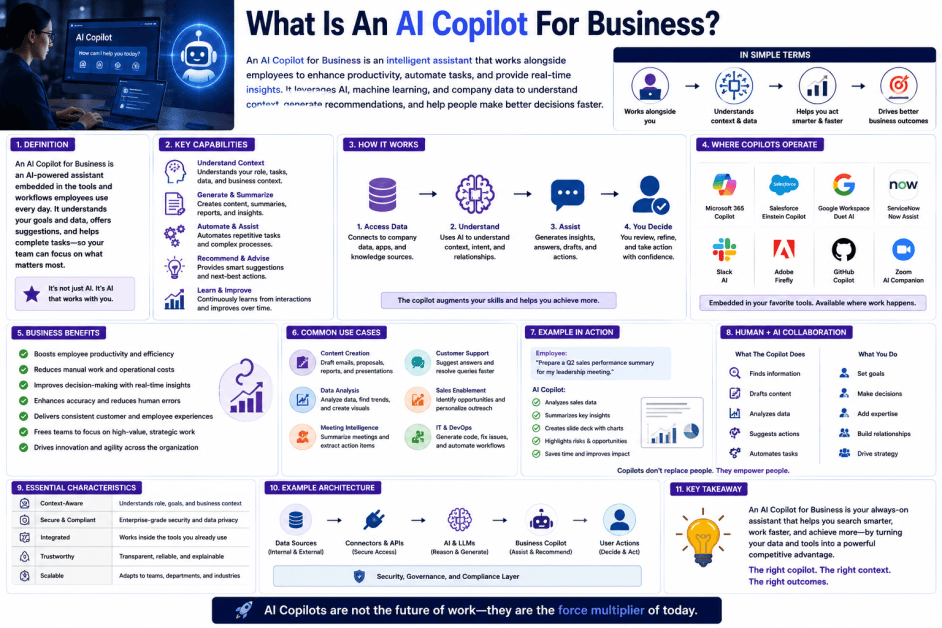
An AI copilot for business is an AI-powered assistant that helps employees perform work-related tasks by understanding requests, accessing business information, generating content, analyzing data, and automating workflows.
Unlike a general-purpose chatbot, a business AI copilot is typically connected to an organization's systems, documents, and applications. This allows it to provide responses and recommendations that are relevant to the company's operations and policies.
For example, an AI copilot can:
-
Draft emails and reports
-
Summarize meetings
-
Answer questions about company policies
-
Retrieve information from internal documents
-
Analyze spreadsheets
-
Generate presentations
-
Assist with coding
-
Create customer support responses
The copilot supports employees by reducing repetitive work and improving productivity.
How Does an AI Copilot for Business Work?
An AI copilot generally follows a structured workflow.
1. Receive a User Request
An employee submits a request using natural language.
Examples include:
-
Summarize this report.
-
Create a sales presentation.
-
Find the latest HR policy.
-
Analyze quarterly revenue.
-
Draft a customer email.
2. Understand the Request
The AI interprets the user's intent using natural language processing (NLP) and large language models (LLMs).
3. Retrieve Business Information
The copilot searches connected sources such as:
-
Company documents
-
Knowledge bases
-
Databases
-
CRM systems
-
ERP platforms
-
Email systems
-
Collaboration tools
Many enterprise copilots use Retrieval-Augmented Generation (RAG) to retrieve relevant information before generating a response.
4. Generate or Execute
The AI creates content, answers questions, performs analysis, or automates actions depending on the user's request.
5. Human Review
Employees review the output, make any necessary changes, and approve important decisions before they are acted upon.
Key Components of an AI Business Copilot
1. Large Language Model (LLM)
Provides language understanding, reasoning, and content generation capabilities.
2. Enterprise Knowledge Base
Supplies company-specific information, documents, and policies.
3. Business Application Integrations
Connects with tools such as CRM, ERP, email, calendars, document management systems, and collaboration platforms.
4. Workflow Automation Engine
Executes repetitive business processes and coordinates tasks across applications.
5. Security and Access Controls
Ensures users only access information they are authorized to view.
Key Characteristics of an AI Copilot for Business
1. Conversational Interface
Employees interact using natural language instead of complex commands.
2. Context-Aware Assistance
Responses are based on company knowledge and the user's current task.
3. Productivity Focus
Designed to save time by assisting with everyday business activities.
4. Workflow Integration
Works within existing business software rather than replacing it.
5. Human-Centered Decision Support
Provides recommendations while leaving final decisions to people.
Common Applications of AI Business Copilots
AI copilots are widely used for:
-
Customer service
-
Sales assistance
-
Marketing content creation
-
Human resources
-
Financial reporting
-
Business intelligence
-
Legal document drafting
-
Software development
-
IT support
-
Project management
-
Meeting summaries
-
Email drafting
-
Enterprise search
-
Executive reporting
Benefits of an AI Copilot for Business
Improves Productivity
Employees spend less time on repetitive administrative tasks.
Faster Access to Information
Relevant company knowledge can be retrieved quickly from multiple systems.
Better Decision Support
AI assists with analysis and recommendations using available business information.
Consistent Content Creation
Documents, emails, and reports follow organizational standards more consistently.
Supports Enterprise Automation
Routine workflows can be streamlined across departments.
Challenges of an AI Copilot for Business
Data Quality
Outdated or inaccurate business information can reduce the quality of AI responses.
Privacy and Security
Organizations must protect confidential information through strong governance and access controls.
Integration Complexity
Connecting multiple enterprise systems may require careful planning and technical expertise.
User Adoption
Employees need training to use AI copilots effectively and responsibly.
Human Oversight Required
People should review AI-generated outputs, validate important information, and make final business decisions, especially for legal, financial, or customer-facing activities.
AI Copilot for Business vs Traditional Business Software
| Feature | Traditional Business Software | AI Copilot for Business |
|---|---|---|
| User Interaction | Menus and forms | Natural language conversations |
| Information Retrieval | Manual searches | AI-powered semantic search |
| Content Creation | User-created | AI-assisted generation |
| Automation | Rule-based workflows | Intelligent workflow assistance |
| Best For | Performing business operations | Assisting employees and improving productivity |
Best Practices for Implementing an AI Business Copilot
Connect Trusted Data Sources
Use accurate and well-maintained business information.
Define Security Policies
Apply role-based access controls and protect sensitive data.
Keep Humans in the Loop
Require human approval for critical decisions and external communications.
Monitor Performance
Measure productivity gains, accuracy, user satisfaction, and business outcomes.
Continuously Update Knowledge
Refresh documents, policies, and knowledge bases to keep responses current.
Future of AI Copilots for Business
AI business copilots are expected to become a standard feature of enterprise software. Advances in large language models, retrieval-augmented generation (RAG), AI agents, multimodal AI, and workflow orchestration are enabling copilots to handle increasingly sophisticated tasks across departments.
Future copilots are likely to collaborate with specialized AI agents, understand text, images, spreadsheets, audio, and video, and proactively recommend actions based on business context. Deeper integration with enterprise applications will allow them to automate more complex workflows while maintaining security, compliance, and governance.
As organizations continue adopting artificial intelligence, AI copilots will play an increasingly important role in improving productivity, accelerating decision-making, and supporting employees across a wide range of business functions. Human expertise, oversight, and accountability will remain essential to ensure that AI-generated outputs are accurate, ethical, and aligned with organizational goals.
Conclusion
An AI copilot for business is an intelligent assistant that helps employees complete tasks, access organizational knowledge, generate content, analyze information, and automate workflows. By combining large language models with enterprise data and business applications, AI copilots enhance productivity while supporting informed decision-making.
From customer support and finance to software development and executive reporting, AI copilots are transforming how organizations work. Their ability to provide context-aware assistance makes them a valuable addition to modern digital workplaces.
As AI technology continues to evolve, business copilots will become more capable, collaborative, and deeply integrated into everyday operations, helping organizations work more efficiently while keeping humans at the center of important decisions.
 What Is an AI Copilot for Business? How AI Business Copilots Work FAQs
POST A COMMENT (0)
All Comments (0)
Replies (0)