





How Voice Assistants Work: A Beginner's Guide to AI-Powered Virtual Assistants
Voice assistants are AI-powered software systems that allow users to interact with devices using spoken language instead of typing or touching a screen. Whether you're asking for the weather, setting a reminder, playing music, controlling smart home devices, or searching the internet, voice assistants use Artificial Intelligence (AI), speech recognition, and Natural Language Processing (NLP) to understand your request and provide a response.
Voice assistants are now built into smartphones, smart speakers, cars, televisions, computers, and many Internet of Things (IoT) devices.
What Is a Voice Assistant?

A voice assistant is a software application that listens to spoken commands, interprets their meaning, performs requested tasks, and responds using synthesized speech or on-screen information.
Examples include digital assistants found on smartphones, smart speakers, and connected devices.
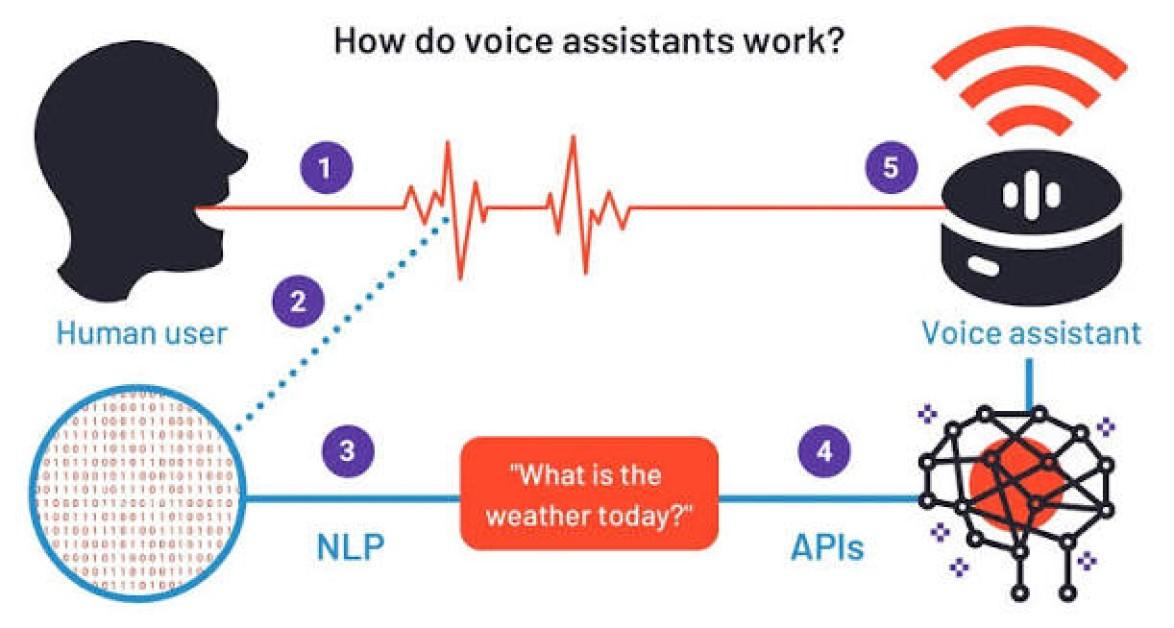
How Voice Assistants Work
Voice assistants perform several coordinated steps within seconds.
Step 1: Wake Word Detection
The device continuously listens for a predefined wake word, such as a custom activation phrase configured by the manufacturer or user. Until the wake word is detected, most assistants process only limited audio locally to identify that activation phrase.
Step 2: Voice Capture
After activation, the microphone records the user's spoken request.
Step 3: Speech Recognition
Automatic Speech Recognition (ASR) converts the spoken audio into text that the computer can understand.
Step 4: Natural Language Processing (NLP)
The AI analyzes the text to determine:
- The user's intent
- Important keywords
- Context
- Requested action
Natural Language Processing enables the assistant to understand conversational language rather than just individual words.
Step 5: Request Processing
Depending on the request, the assistant may:
- Search the internet
- Access local device information
- Retrieve calendar events
- Control smart home devices
- Play media
- Query cloud-based services
Many voice assistants use cloud computing for complex AI processing, while some commands can be handled directly on the device for improved speed and privacy.
Step 6: Generate a Response
The system prepares an answer or completes the requested action.
Step 7: Text-to-Speech
Finally, Text-to-Speech (TTS) technology converts the response into natural-sounding speech that is played through the device's speaker.
The entire interaction often takes only a few seconds.
Key Technologies Behind Voice Assistants
Several advanced technologies work together.
Automatic Speech Recognition (ASR)
Converts spoken language into written text.
Natural Language Processing (NLP)
Helps the system understand grammar, context, meaning, and user intent.
Artificial Intelligence
AI enables assistants to learn from interactions, improve accuracy, and deliver more relevant responses.
Machine Learning
Machine learning models improve speech recognition and language understanding over time using large datasets and ongoing refinement.
Cloud Computing
Cloud infrastructure provides the computing power needed for many advanced AI tasks.
Text-to-Speech (TTS)
Converts digital text into human-like spoken responses.
Common Applications of Voice Assistants
Voice assistants support many everyday activities.
Smart Home Control
Operate lights, thermostats, security cameras, smart plugs, and other connected devices.
Information Search
Answer questions about weather, news, sports, facts, and general knowledge.
Entertainment
Play music, podcasts, audiobooks, and streaming content.
Productivity
Set reminders, alarms, timers, calendar events, and to-do lists.
Communication
Make phone calls, send messages, and read notifications.
Navigation
Provide directions, traffic updates, and nearby location information.
Accessibility
Help users interact with technology using voice instead of touch or typing.
Benefits of Voice Assistants
Voice assistants provide numerous advantages.
Hands-Free Operation
Users can perform tasks while driving, cooking, exercising, or multitasking.
Faster Interaction
Speaking is often quicker than typing simple requests.
Improved Accessibility
Voice control makes technology easier to use for people with visual, mobility, or other accessibility needs.
Smart Home Automation
Users can control multiple connected devices using simple voice commands.
Personalized Experiences
Many assistants adapt to user preferences, routines, and settings to provide more relevant assistance.
Challenges of Voice Assistants
Despite their convenience, voice assistants present several considerations.
Privacy
Voice assistants may process audio recordings or voice requests to improve functionality, depending on user settings and the service provider's policies.
Speech Recognition Errors
Background noise, accents, multiple speakers, or unclear pronunciation may affect recognition accuracy.
Internet Dependence
Many advanced features require an active internet connection.
Security
Voice-enabled accounts should be protected with strong authentication and appropriate privacy settings.
Voice Assistants vs. Chatbots
Although both use Artificial Intelligence, they differ in interaction methods.
Voice Assistants
- Communicate primarily through spoken language.
- Use microphones, speakers, and speech recognition.
- Designed for hands-free interaction.
Chatbots
- Communicate primarily through text.
- Operate within websites, messaging apps, and customer support systems.
- Focus on typed conversations.
Many modern AI platforms combine both voice and text capabilities.
Best Practices for Using Voice Assistants
Users should follow these recommendations.
Review Privacy Settings
Understand and adjust how voice recordings and personal data are stored or processed.
Enable Strong Account Security
Protect associated accounts with Multi-Factor Authentication (MFA).
Keep Software Updated
Install updates to improve security, performance, and new features.
Use Trusted Smart Devices
Connect only reputable smart home products to voice assistants.
Manage Permissions
Grant microphone, location, and other permissions only when necessary.
Future of Voice Assistants
Voice assistants continue to evolve through generative Artificial Intelligence, large language models, edge AI, multimodal interaction, and smarter IoT integration. Future assistants are expected to understand more complex conversations, remember context across interactions, support multiple languages more naturally, and perform increasingly sophisticated tasks while processing more requests directly on devices to improve privacy and reduce latency. As AI advances, voice assistants will become more conversational, personalized, and deeply integrated into homes, workplaces, vehicles, and wearable devices.
Conclusion
Voice assistants have transformed how people interact with technology by enabling natural, hands-free communication through speech. By combining speech recognition, Natural Language Processing, Artificial Intelligence, cloud computing, and text-to-speech technology, they can understand user requests and perform a wide range of tasks in seconds. As AI continues to improve, voice assistants will become even more capable, intelligent, and central to everyday digital experiences.
 How Voice Assistants Work: Complete Guide Explained FAQs
POST A COMMENT (0)
All Comments (0)
Replies (0)