





How AI Upscales Images: A Complete Guide
Low-resolution images often appear blurry, pixelated, or lacking in detail when viewed on high-resolution screens or printed at larger sizes. Traditionally, enlarging an image simply stretched existing pixels, resulting in poor image quality and noticeable artifacts.
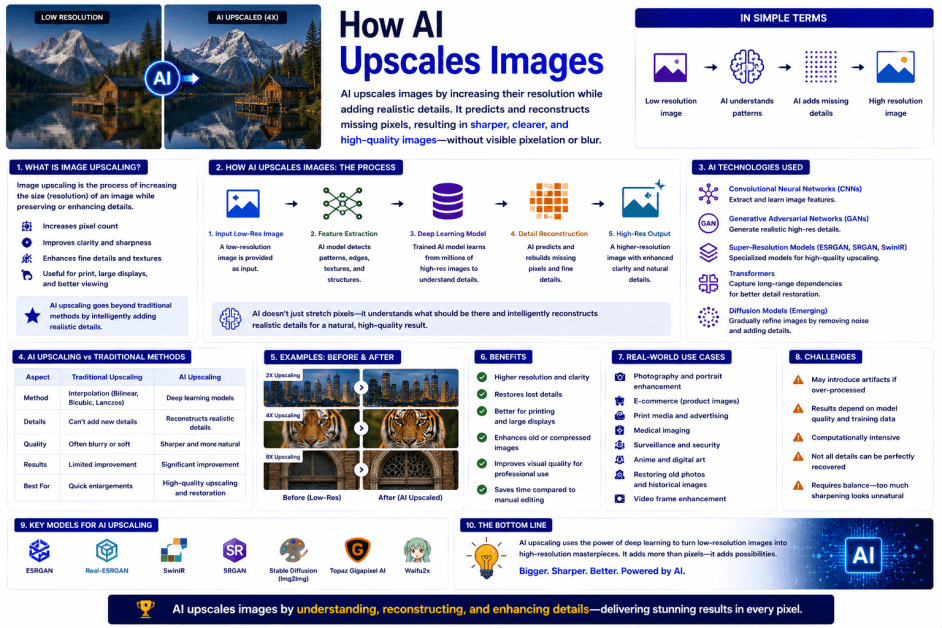
Modern AI-powered image upscaling has transformed this process. Using deep learning, computer vision, and super-resolution algorithms, AI can intelligently increase an image's resolution while preserving—and in some cases reconstructing—fine details. Rather than merely enlarging pixels, AI analyzes image content to create a sharper and more natural-looking result.
Today, AI image upscaling is widely used in photography, graphic design, digital art, e-commerce, gaming, medical imaging, satellite imagery, film restoration, and enterprise content creation.
What Is AI Image Upscaling?
AI image upscaling is the process of using artificial intelligence to increase the resolution of an image while maintaining or improving its visual quality.
Unlike traditional resizing methods that duplicate or interpolate pixels, AI studies patterns, textures, edges, and objects within an image to generate additional pixels that better match the original content.
AI upscaling can improve:
-
Low-resolution photographs
-
Digital artwork
-
Product images
-
Historical photographs
-
Video frames
-
Scanned documents
-
Gaming textures
-
Satellite images
-
Medical images
What Is AI Super-Resolution?
AI Super-Resolution is the core technology behind AI image upscaling. It uses deep learning models trained on large datasets of low-resolution and high-resolution image pairs to learn how high-quality images should appear.
Instead of simply enlarging an image, super-resolution models estimate realistic fine details, producing images that are typically sharper and more detailed than those created with traditional scaling techniques.
How Does AI Upscale Images?
AI-powered image upscaling generally follows these steps.
1. Analyze the Image
The AI examines the image to identify:
-
Objects
-
Faces
-
Edges
-
Textures
-
Patterns
-
Colors
-
Fine details
2. Estimate Missing Information
Using deep learning models, AI predicts what additional visual details should exist between existing pixels.
3. Generate Additional Pixels
The AI creates new pixels based on learned image patterns rather than simple mathematical interpolation.
4. Enhance Details
The system improves:
-
Sharpness
-
Texture
-
Edge definition
-
Color consistency
-
Overall image clarity
5. Produce the Upscaled Image
The enhanced high-resolution version is generated for viewing, editing, or printing.
Key Technologies Behind AI Image Upscaling
1. Computer Vision
Enables AI to recognize image structures, objects, and visual features.
2. Deep Learning
Neural networks learn relationships between low-resolution and high-resolution images.
3. Super-Resolution Models
Specialized AI models reconstruct realistic image details during enlargement.
4. Convolutional Neural Networks (CNNs)
CNNs identify patterns and textures that help preserve image quality during scaling.
5. Generative AI
Some advanced systems generate realistic textures and fine details in areas where information is limited.
Key Characteristics of AI Image Upscaling
1. Intelligent Pixel Generation
New pixels are generated based on learned visual patterns rather than simple enlargement.
2. Detail Preservation
Edges, textures, and important image features remain sharper than with traditional resizing.
3. Context Awareness
Different image regions receive customized enhancement based on their content.
4. High-Quality Enlargement
Images can often be enlarged by two, four, or more times while maintaining good visual quality.
5. Automated Processing
Large batches of images can be upscaled with minimal manual effort.
Common Applications of AI Image Upscaling
AI image upscaling is widely used in:
-
Professional photography
-
Smartphone photography
-
Graphic design
-
Digital publishing
-
E-commerce product photography
-
Video restoration
-
Film remastering
-
Gaming and texture enhancement
-
Medical imaging
-
Satellite imagery
-
Historical photo restoration
-
Marketing materials
-
Scientific imaging
-
Enterprise content management
Benefits of AI Image Upscaling
Improves Image Resolution
Creates higher-resolution versions suitable for modern displays and printing.
Preserves Visual Quality
Maintains sharpness and textures better than conventional resizing methods.
Restores Older Images
Enhances scanned photographs and archived visual content.
Saves Time
Automates complex image enhancement processes.
Supports Professional Workflows
Enables businesses and creative professionals to reuse legacy or low-resolution assets more effectively.
Challenges of AI Image Upscaling
Limited Original Information
AI cannot recover details that were never captured in the original image with complete certainty.
Artificial Detail Generation
Some reconstructed textures or fine details are AI-generated estimates rather than exact representations of the original scene.
Processing Requirements
Upscaling very large or high-resolution images can require substantial computing resources.
Specialized Imaging Needs
Applications such as medical diagnostics, legal evidence, or scientific analysis may require carefully validated enhancement methods.
Human Review Remains Important
Professionals should verify upscaled images before using them in situations where visual accuracy and authenticity are critical.
Traditional Image Resizing vs AI Image Upscaling
| Feature | Traditional Image Resizing | AI Image Upscaling |
|---|---|---|
| Enlargement Method | Pixel interpolation | AI-generated super-resolution |
| Detail Preservation | Often loses sharpness | Preserves and enhances details |
| Context Awareness | Limited | Understands image content |
| Visual Quality | May appear blurry | Generally sharper and more natural |
| Best For | Basic resizing | High-quality image enhancement |
Best Practices for Using AI Image Upscaling
Use the Best Available Original
Higher-quality source images generally produce better upscaled results.
Select an Appropriate Scale
Avoid enlarging images beyond what is necessary for the intended use.
Review Fine Details
Inspect important features such as faces, text, and product details after upscaling.
Protect Sensitive Images
Use trusted tools and secure workflows when processing confidential or regulated images.
Combine AI with Manual Editing
For professional projects, use AI for initial upscaling and apply manual refinements where needed.
Future of AI Image Upscaling
AI image upscaling is expected to become increasingly powerful as deep learning, generative AI, and computer vision technologies continue to advance. Future systems will better understand image content, lighting, textures, and artistic intent, enabling even higher-quality enlargements with fewer artifacts and more natural-looking details.
Real-time AI upscaling is also becoming more common in smartphones, cameras, streaming services, video games, and creative software. Improvements in multimodal AI and specialized super-resolution models will enable higher-quality restoration of historical photographs, video content, scientific imagery, and satellite data while reducing processing times.
As artificial intelligence evolves, AI image upscaling will become an essential technology for photography, media production, digital publishing, healthcare, scientific research, and enterprise content creation, helping users maximize the value of both new and legacy visual assets.
Conclusion
AI image upscaling uses super-resolution technology, deep learning, and computer vision to intelligently increase image resolution while preserving important visual details. Rather than simply enlarging pixels, AI analyzes image content and reconstructs realistic textures, edges, and patterns to produce sharper, higher-quality results.
From photography and graphic design to gaming, medical imaging, and historical restoration, AI-powered upscaling has transformed how low-resolution images are enhanced for modern displays and professional use. While the technology can deliver remarkable improvements, human review remains important for applications where visual accuracy is essential.
As AI continues to advance, image upscaling will become faster, more accurate, and more deeply integrated into creative tools, enterprise workflows, and everyday digital experiences.
 How AI Upscales Images: The Technology Behind AI Image Super-Resolution FAQs
POST A COMMENT (0)
All Comments (0)
Replies (0)