





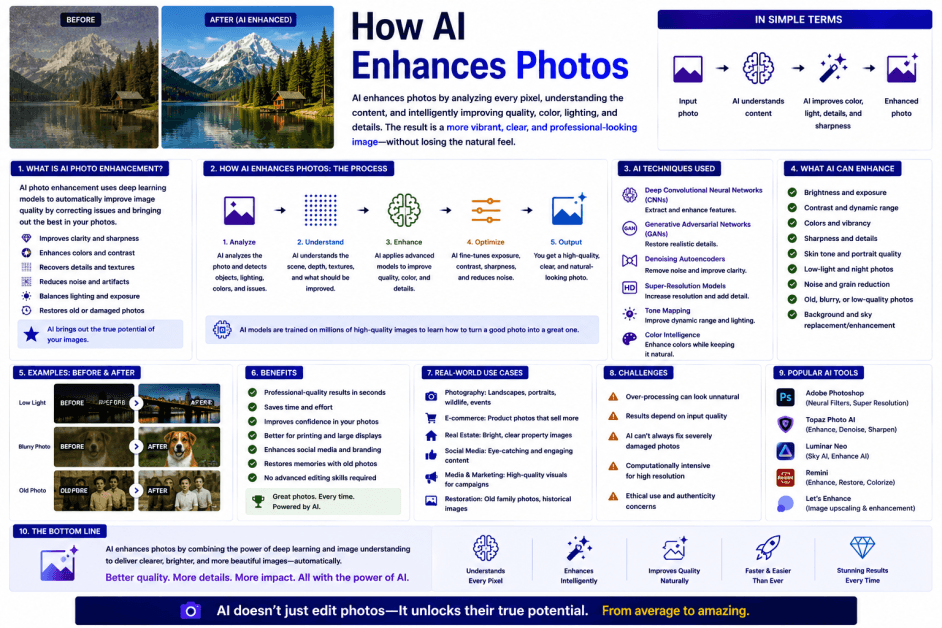
How AI Enhances Photos: A Complete Guide
From smartphone cameras to professional editing software, artificial intelligence is transforming how photos are captured, improved, and restored. Tasks that once required advanced editing skills—such as removing noise, sharpening blurry images, restoring old photographs, or adjusting lighting—can now be completed in seconds with AI-powered tools.
AI photo enhancement uses advanced computer vision, machine learning, and deep learning algorithms to analyze images and automatically improve their quality. Rather than simply applying fixed filters, modern AI systems understand the contents of an image and make intelligent adjustments based on objects, faces, lighting conditions, and overall composition.
Today, AI photo enhancement is widely used in photography, social media, e-commerce, healthcare, real estate, journalism, design, and enterprise content creation.
What Is AI Photo Enhancement?
AI photo enhancement is the use of artificial intelligence to automatically improve the quality, appearance, or clarity of digital images.
Unlike traditional editing tools that require manual adjustments, AI-powered enhancement analyzes image content and applies intelligent corrections tailored to each photograph.
AI enhancement can improve:
-
Image sharpness
-
Brightness and exposure
-
Color accuracy
-
Contrast
-
Noise reduction
-
Resolution
-
Facial details
-
Background quality
-
Object clarity
-
Overall image quality
How Does AI Enhance Photos?
AI-powered photo enhancement generally follows these steps.
1. Analyze the Image
The AI examines the photograph to identify:
-
Objects
-
Faces
-
Backgrounds
-
Lighting
-
Colors
-
Edges
-
Textures
-
Image quality
2. Detect Quality Issues
The system identifies problems such as:
-
Blur
-
Digital noise
-
Poor lighting
-
Low resolution
-
Color imbalance
-
Compression artifacts
3. Apply Intelligent Enhancements
AI automatically adjusts image properties while preserving natural appearance.
Possible enhancements include:
-
Sharpening details
-
Reducing noise
-
Correcting exposure
-
Enhancing colors
-
Improving dynamic range
-
Upscaling resolution
4. Refine Specific Areas
The AI may separately optimize faces, skies, landscapes, text, products, or other objects depending on the image.
5. Generate the Enhanced Photo
The improved image is produced for user review, with many applications allowing further manual adjustments if desired.
Key Technologies Behind AI Photo Enhancement
1. Computer Vision
Enables AI to recognize objects, people, scenes, and image characteristics.
2. Deep Learning
Neural networks learn enhancement techniques from millions of example images.
3. Image Processing
Algorithms adjust brightness, contrast, sharpness, colors, and other visual properties.
4. Super-Resolution Models
AI reconstructs fine details to increase image resolution while maintaining visual quality.
5. Generative AI
Some systems generate missing image details, repair damaged areas, or intelligently remove unwanted objects.
Key Characteristics of AI Photo Enhancement
1. Automatic Optimization
Enhancements are performed with minimal manual input.
2. Content Awareness
AI adjusts different parts of an image based on what they contain.
3. Fast Processing
Many AI tools produce enhanced images within seconds.
4. High-Quality Results
Modern AI systems can significantly improve image clarity while preserving natural appearance.
5. Scalable Editing
Large collections of photos can be processed efficiently using automated workflows.
Common Applications of AI Photo Enhancement
AI photo enhancement is widely used in:
-
Smartphone photography
-
Professional photography
-
Social media content creation
-
E-commerce product images
-
Marketing and advertising
-
Journalism
-
Real estate photography
-
Medical imaging support
-
Historical photo restoration
-
Graphic design
-
Digital publishing
-
Enterprise content management
-
Security imaging
-
Scientific imaging
Benefits of AI Photo Enhancement
Improves Image Quality
Automatically enhances clarity, sharpness, and overall visual appeal.
Saves Time
Reduces the need for extensive manual editing.
Restores Older Photos
Can improve faded, damaged, or low-quality historical images.
Increases Productivity
Allows businesses and creators to edit large volumes of images efficiently.
Makes Professional Editing More Accessible
Enables users with limited editing experience to achieve high-quality results.
Challenges of AI Photo Enhancement
Overprocessing
Excessive enhancements may create unrealistic or artificial-looking images.
Limited Recovery
AI cannot always recover details that were never captured in the original image.
Processing Requirements
High-resolution image enhancement may require significant computing resources.
Ethical Considerations
Substantial AI-generated modifications should be used responsibly, particularly in journalism, legal evidence, scientific imaging, and other contexts where image authenticity is important.
Human Review Remains Important
Professional photographers, editors, designers, and organizations should review AI-enhanced images to ensure they accurately represent the intended subject and meet quality standards.
Traditional Photo Editing vs AI Photo Enhancement
| Feature | Traditional Photo Editing | AI Photo Enhancement |
|---|---|---|
| Editing Process | Manual adjustments | Automated AI analysis and enhancement |
| Required Skill | Moderate to advanced | Beginner-friendly |
| Speed | Slower | Fast, often real time |
| Content Awareness | Limited | Understands objects, faces, and scenes |
| Best For | Precise manual control | Efficient, intelligent image improvement |
Best Practices for Using AI Photo Enhancement
Start with the Highest-Quality Original
Better source images generally produce better enhancement results.
Avoid Excessive Editing
Use AI enhancements to improve image quality while maintaining a natural appearance.
Review Results Carefully
Verify that important details, colors, and proportions remain accurate.
Protect Sensitive Images
Use trusted platforms and follow privacy policies when processing confidential or personal photographs.
Combine AI with Manual Editing
For professional projects, use AI to speed up routine enhancements and apply manual refinements where needed.
Future of AI Photo Enhancement
AI photo enhancement is expected to become increasingly advanced as computer vision, generative AI, and multimodal models continue to evolve. Future systems will better understand image context, lighting, depth, and artistic intent, enabling more accurate and personalized enhancements with minimal user input.
Emerging technologies are also expanding AI capabilities beyond basic editing. Future tools may intelligently reconstruct damaged photographs, improve low-light images, enhance video frames, remove complex visual distractions, and generate realistic missing details while preserving image quality. Integration with smartphones, cloud platforms, creative software, and enterprise workflows will make AI enhancement even more accessible.
As artificial intelligence continues to improve, AI-powered photo enhancement will play a central role in photography, digital publishing, marketing, healthcare, scientific imaging, and visual content creation, helping users produce higher-quality images more efficiently.
Conclusion
AI photo enhancement uses computer vision, deep learning, image processing, and generative AI to automatically improve the quality of digital images. By analyzing image content rather than applying generic filters, AI can intelligently sharpen details, reduce noise, adjust lighting, enhance colors, and restore photographs with remarkable speed.
From smartphone photography and social media to professional design, journalism, healthcare, and enterprise content management, AI photo enhancement is making advanced image editing faster and more accessible. While these tools deliver impressive results, thoughtful human review remains important to ensure authenticity, accuracy, and appropriate use.
As AI technologies continue to advance, photo enhancement will become even more intelligent, helping individuals and organizations create visually compelling, high-quality images with greater efficiency and creativity.
 How AI Enhances Photos: The Technology Behind AI Photo Enhancement FAQs
POST A COMMENT (0)
All Comments (0)
Replies (0)