How Two-Factor Authentication (2FA) Works: A Beginner's Guide to Extra Account Security
Two-Factor Authentication (2FA) is a security method that requires users to verify their identity using two different authentication factors before gaining access to an account or system. Instead of relying only on a password, 2FA adds an extra verification step, making it significantly harder for attackers to access accounts even if they know the password.
Today, 2FA is widely used for email accounts, online banking, social media, cloud services, e-commerce platforms, workplace systems, and government portals.
What Is Two-Factor Authentication (2FA)?

Two-Factor Authentication is an identity verification process that combines two independent forms of authentication to confirm that the person attempting to log in is the legitimate account owner.
By requiring multiple forms of verification, 2FA provides stronger protection than password-only authentication.
How Two-Factor Authentication Works
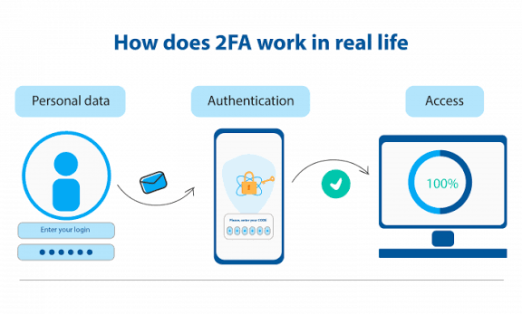
A typical 2FA login follows several steps.
Step 1: The User Enters a Username and Password
The user first signs in with their username or email address and password.
This is the first authentication factor—something the user knows.
Step 2: The System Requests a Second Verification
After verifying the password, the system asks for a second form of authentication before granting access.
Step 3: The User Provides the Second Factor
Depending on the service, the second verification may be:
- A one-time password (OTP)
- A code generated by an authenticator app
- A biometric scan
- A hardware security key
- A push notification approval
This is typically something the user has or something the user is.
Step 4: Verification
The authentication system verifies the second factor. If it matches the expected value, access is granted.
Step 5: Secure Access
Only after both authentication factors are successfully verified can the user access the account or system.
The entire process usually takes only a few seconds.
The Three Main Authentication Factors
Authentication methods are generally divided into three categories.
Something You Know
Information only the user should know.
Examples include:
- Passwords
- PINs
- Security questions
Something You Have
A physical device or item owned by the user.
Examples include:
- Smartphone
- Authenticator app
- Hardware security key
- Smart card
- OTP token
Something You Are
Biometric characteristics unique to the user.
Examples include:
- Fingerprint
- Face recognition
- Iris scan
- Voice recognition
Two-Factor Authentication combines two different categories, not simply two passwords.
Common Types of Two-Factor Authentication
Organizations use various second-factor methods.
SMS One-Time Password (OTP)
A temporary verification code is sent by text message to the user's mobile phone.
Authenticator Apps
Applications generate time-based one-time passwords (TOTPs) that change every 30–60 seconds and do not rely on SMS delivery.
Push Notifications
A trusted device receives a notification asking the user to approve or deny the login attempt.
Hardware Security Keys
Physical security keys connect through USB, NFC, or Bluetooth and provide strong protection against phishing attacks.
Biometric Authentication
Users verify their identity using fingerprints, facial recognition, or other biometric features.
Why Two-Factor Authentication Is Important
2FA provides several security benefits.
Protects Against Stolen Passwords
Even if attackers obtain a password, they usually cannot access the account without the second authentication factor.
Reduces Phishing Risk
Authenticator apps, hardware security keys, and biometric methods provide stronger protection than passwords alone.
Improves Account Security
Adding an extra verification layer significantly reduces unauthorized access.
Supports Regulatory Compliance
Many organizations use 2FA to meet cybersecurity and data protection requirements.
Where Two-Factor Authentication Is Used
2FA protects many online services.
Online Banking
Banks require additional verification for account access and financial transactions.
Email Accounts
Major email providers support 2FA to protect sensitive communications.
Social Media
Platforms offer 2FA to reduce account hijacking.
Cloud Services
Cloud providers use 2FA to secure business applications and stored data.
Enterprise Systems
Organizations protect employee accounts and confidential information using 2FA.
Government Services
Many public sector portals require multi-step identity verification.
Benefits of Two-Factor Authentication
2FA offers numerous advantages.
Stronger Security
Two independent authentication factors provide significantly better protection than passwords alone.
Lower Risk of Account Takeover
Attackers face an additional barrier even if login credentials are compromised.
Greater User Confidence
Users gain reassurance that their accounts are better protected.
Simple to Use
Modern authentication methods often take only a few seconds to complete.
Broad Compatibility
Most major websites, apps, and online services support some form of 2FA.
Challenges of Two-Factor Authentication
Despite its benefits, 2FA has several considerations.
Lost Devices
Users may temporarily lose access if their authentication device is unavailable.
SMS Vulnerabilities
SMS-based verification can be less secure than authenticator apps or hardware security keys because it may be vulnerable to SIM-swapping attacks.
User Convenience
The additional verification step adds a small amount of time to the login process.
Backup Planning
Recovery methods are important if a user changes phones or loses access to authentication devices.
Two-Factor Authentication vs. Multi-Factor Authentication (MFA)
Although often used interchangeably, they are not identical.
Two-Factor Authentication (2FA)
Requires exactly two authentication factors.
Multi-Factor Authentication (MFA)
Requires two or more authentication factors and may combine passwords, biometrics, security keys, and other verification methods.
Every 2FA system is a form of MFA, but not every MFA system is limited to only two factors.
Best Practices for Using 2FA
Users should follow these recommendations.
Enable 2FA Everywhere Possible
Activate 2FA on email, banking, cloud storage, social media, and other important accounts.
Prefer Authenticator Apps or Hardware Security Keys
These methods generally provide stronger protection than SMS-based verification.
Save Backup Codes Securely
Store recovery codes in a safe location in case access to your authentication device is lost.
Keep Devices Updated
Regular software updates improve both security and reliability.
Stay Alert for Phishing
Never approve unexpected login requests or share one-time verification codes with anyone.
Future of Authentication
Authentication technology continues to evolve through passwordless login systems, biometric verification, hardware security keys, passkeys, Artificial Intelligence-powered fraud detection, and behavioral authentication. Modern authentication increasingly relies on cryptographic credentials stored securely on trusted devices, reducing dependence on traditional passwords. As cyber threats continue to evolve, stronger authentication methods will play an increasingly important role in protecting digital identities.
Conclusion
Two-Factor Authentication adds an essential layer of security by requiring two independent forms of identity verification before granting access to an account. By combining passwords with one-time codes, authenticator apps, hardware security keys, or biometric verification, 2FA greatly reduces the risk of unauthorized access. As online services continue to grow, enabling Two-Factor Authentication is one of the simplest and most effective ways to strengthen personal and business cybersecurity.